· Ahmed Chaabni · Astro · 3 min read
How a Curiosity About 'Server Islands' Built My Business Website
How diving into Jahia's npm modules led me to discover Astro.js, rebuild Gladtek.com, and ship a high-performance client project.
As a developer deeply entrenched in the enterprise world specifically working with Jahia CMS, Vaadin, and Java my daily routine usually revolves around robust backend architectures and complex integrations. But recently, a deep dive into Jahia’s npm modules (@jahia/javascript-modules-library) sent me down a rabbit hole that completely changed how I build websites.
It started with a specific curiosity: Server Islands.
The Discovery
I was exploring how Jahia handles its JavaScript modules specifically the “Island Architecture” concept where components are rendered on the server but hydrated on the client. I was fascinated by how this hybrid approach could offer the best of both worlds: the SEO and performance of server-side rendering (SSR) with the interactivity of client-side apps.
While researching how these “islands” function in the Jahia ecosystem, I stumbled upon a framework that has made this exact architecture its entire identity: Astro.js.

Why Astro?
The more I read about Astro, the more it clicked. It wasn’t just another JavaScript framework; it was a content-focused static site generator that perfected the architecture I was researching.
Here are the key advantages that hooked me:
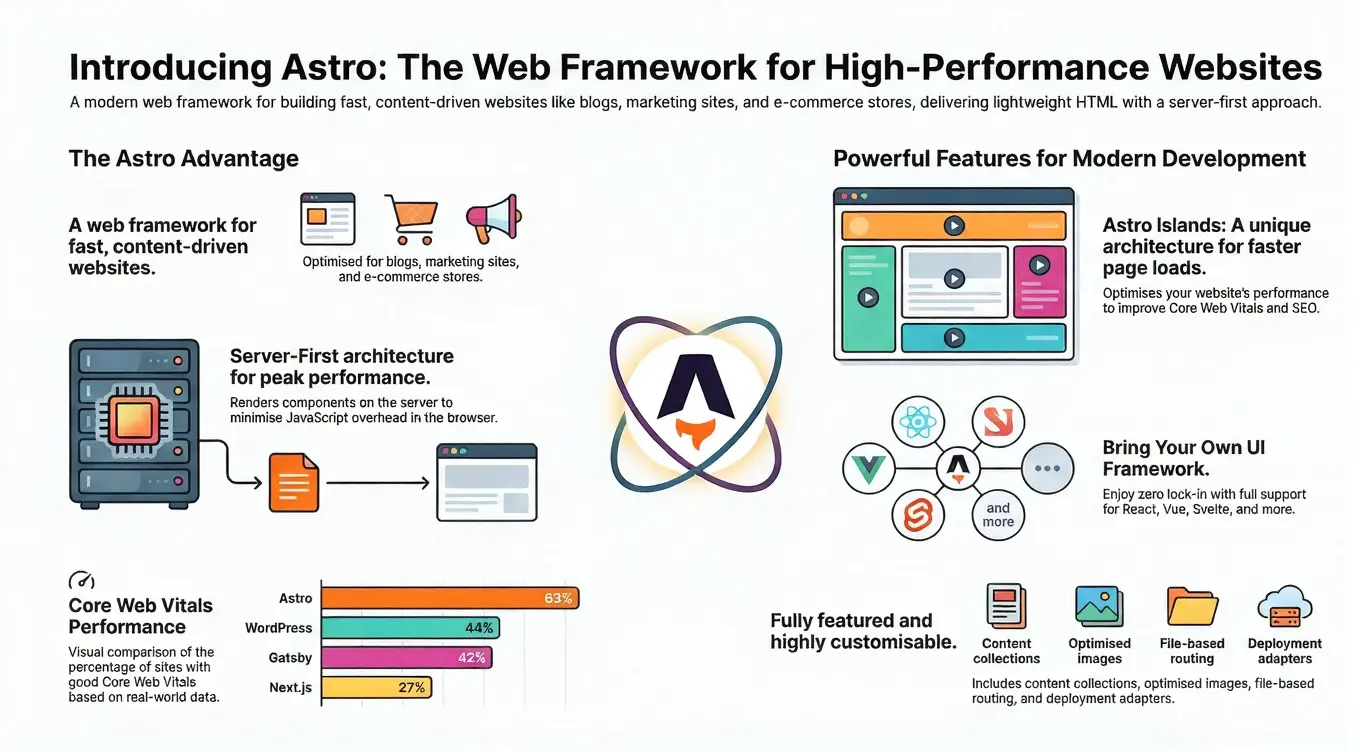
- Islands Architecture (The Core Link): Just like the concept that piqued my interest in Jahia modules, Astro allows you to build a static HTML page where only the interactive bits (the “islands”) are hydrated with JavaScript. This means zero JavaScript overhead for the rest of the page.
- Performance by Default: Astro ships no JavaScript to the client unless you explicitly ask it to. For a consulting and content-heavy site, this ensures lightning-fast load times.
- Server Islands: This feature allows you to defer the rendering of dynamic content (like personalized user data) so the main page loads instantly from the cache, while the dynamic “island” loads in parallel.
- Agnostic UI: I didn’t have to lock myself into one UI library. Astro lets you bring your own whether it’s React, Vue, or Svelte.
Building Gladtek.com
I decided to put Astro to the test immediately. I wanted to refresh my company website, Gladtek, which serves as the hub for our expertise in Jahia CMS, Vaadin, and IBM JRules.
Instead of spending weeks coding from scratch, I leveraged a ready-made Astro template. The developer experience was phenomenal. The template gave me a solid structure, but Astro’s simplicity allowed me to easily customize it to fit our brand philosophy: Simplicity, Best Practices, and High Performance.
The result is a blazing-fast site that showcases our services from Jahia CMS consulting to Vaadin expertise and hosts our technical blog. If you browse the site, you’ll see it handles everything from our “OSS contributions” section to deep-dive articles on “Jahia provisioning commands” and “DAM integrations” without breaking a sweat.
The Verdict? We Shipped It.
The experiment was so successful that it didn’t stop at my own website. We shipped a full Astro.js project for a client using Storyblok, delivering them a high-performance solution that aligns perfectly with the modern web standards we advocate for at Gladtek.

If you are a Java developer or CMS expert looking for a frontend solution that respects your need for performance and structure, I highly recommend following that curiosity about “Server Islands” straight into Astro.
Watch: Astro Server Islands Explained
For a deeper technical dive into the feature that started this whole journey, check out this breakdown: