· Ahmed Chaabni · Vaadin · 9 min read
Building Landing Pages with Vaadin 25 & Tailwind CSS 4
In the fast-paced world of frontend development, Java has often been viewed as the "reliable workhorse" of the backend—sturdy, but perhaps a step behind the latest UI trends. However, with the release of Vaadin 25 and the groundbreaking Tailwind CSS 4, that narrative is officially over.

- 1From Dashboards to Landing Pages: Why This Matters
- 2Why Vaadin 25 and Tailwind CSS work well together
- 3What the Vaadin Tailwind Landing project demonstrates
- 4Under the hood: how Tailwind is wired into Vaadin 25
- 51. Enabling the experimental Tailwind feature
- 62. Building the page with Java components
- 73. Styling with Tailwind utilities from Java
- 84. Vite as the build tool
- 9Cloning and running the project
- 10Running with Docker
- 11Adapting the landing page to your product
- 121. Replace the content
- 132. Tweak the visual identity with Tailwind utilities
- 143. Extend the layout with new sections
- 15When to use this template
- 16🎬 See the theme color switch in Action
- 17Conclusion
Vaadin 25 changed how styling works in Vaadin applications. Themes are now plain CSS stylesheets that can be loaded and swapped at runtime, which opens the door for modern tooling like Tailwind CSS to plug directly into the framework.
On top of that, Vaadin 25 introduces an experimental Tailwind integration that lets you apply Tailwind utility classes straight from your Java code.
To explore this new styling model in a concrete way, the vaadin-tailwind-landing project was created. It is an open source example of a modern, responsive landing page built with:
- Vaadin 25 Flow
- Tailwind CSS 4 experimental integration
- Vite as the frontend build tool
The goal is simple: give Java developers a ready to use landing page template that feels like Tailwind, but is implemented entirely in Java, using Vaadin components and HTML elements.
From Dashboards to Landing Pages: Why This Matters
At Gladtek and before it, we’ve shipped multiple enterprise applications with Vaadin over the years, most often complex dashboards and backoffice applications. These serve internal teams where the focus is data density, workflow efficiency, and consistency across enterprise toolchains.
Vaadin Flow excels here. Server-side rendering, strong typing, and the component model make it perfect for data-heavy screens with grids, charts, forms, and navigation that scale across deployments.
But enterprise customers also need public-facing marketing sites and product landing pages.
Historically, we’ve paired Vaadin backoffices with separate frontend frameworks. This works but creates context-switching and deployment complexity.
The vaadin-tailwind-landing project changes that equation.
Now we can deliver:
- Vaadin backoffice + Vaadin marketing site from unified codebase
- Tailwind-styled public pages alongside Lumo or Aura styled admin screens
- Single Java deployment serving both internal tools and customer-facing pages
This unifies the stack end-to-end. The same team that ships your dashboard can now own the landing page that drives signups. No more “find me a frontend developer” conversations.
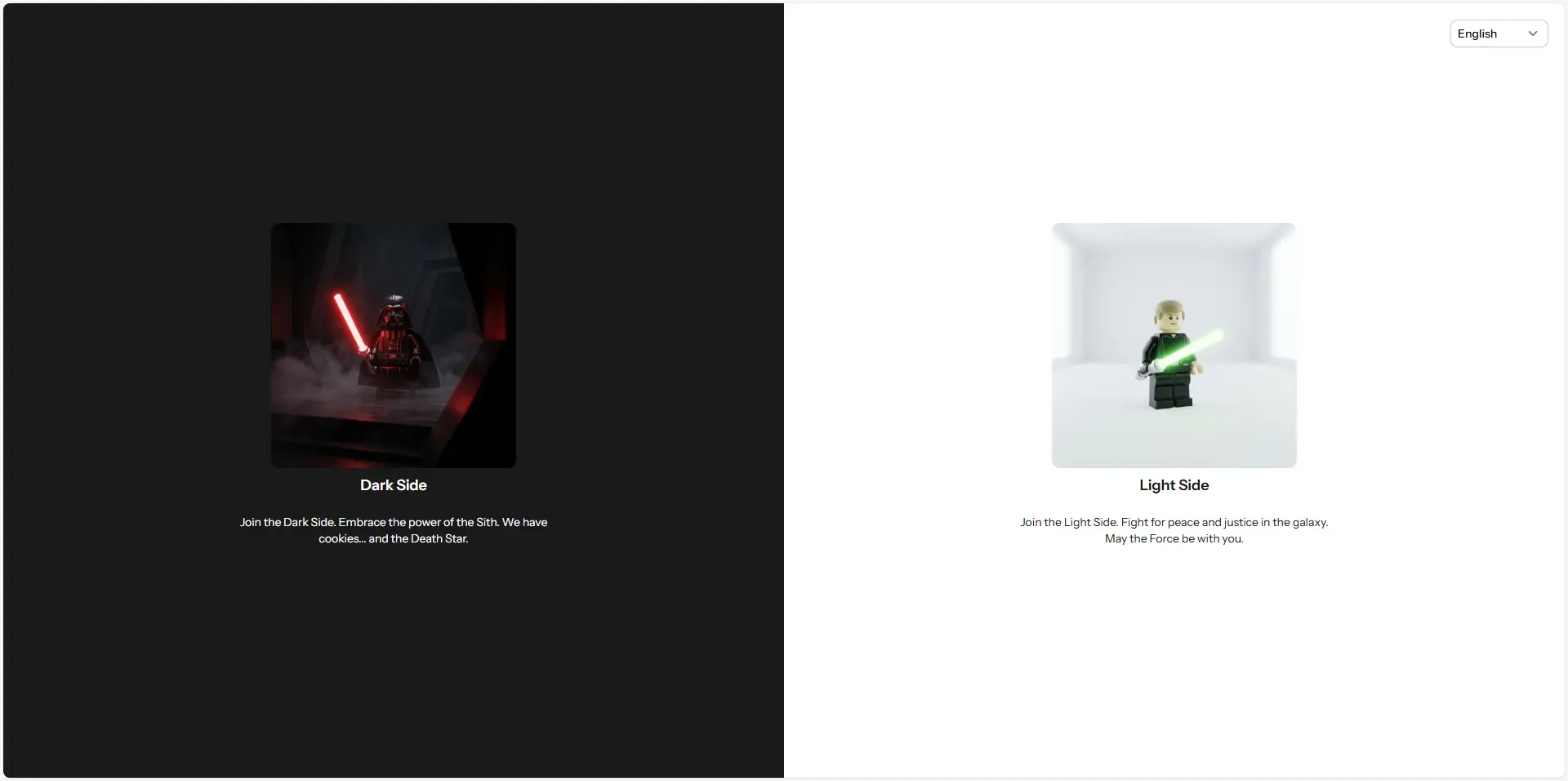
Check out the live demo below :

Why Vaadin 25 and Tailwind CSS work well together
Vaadin 25 continues a clear direction from the framework team: let developers use normal web tools instead of Vaadin specific abstractions for everything. Themes are no longer tied to internal theming mechanisms, they are regular stylesheets that can be loaded and unloaded dynamically. That makes integration with tools like Tailwind much more natural.
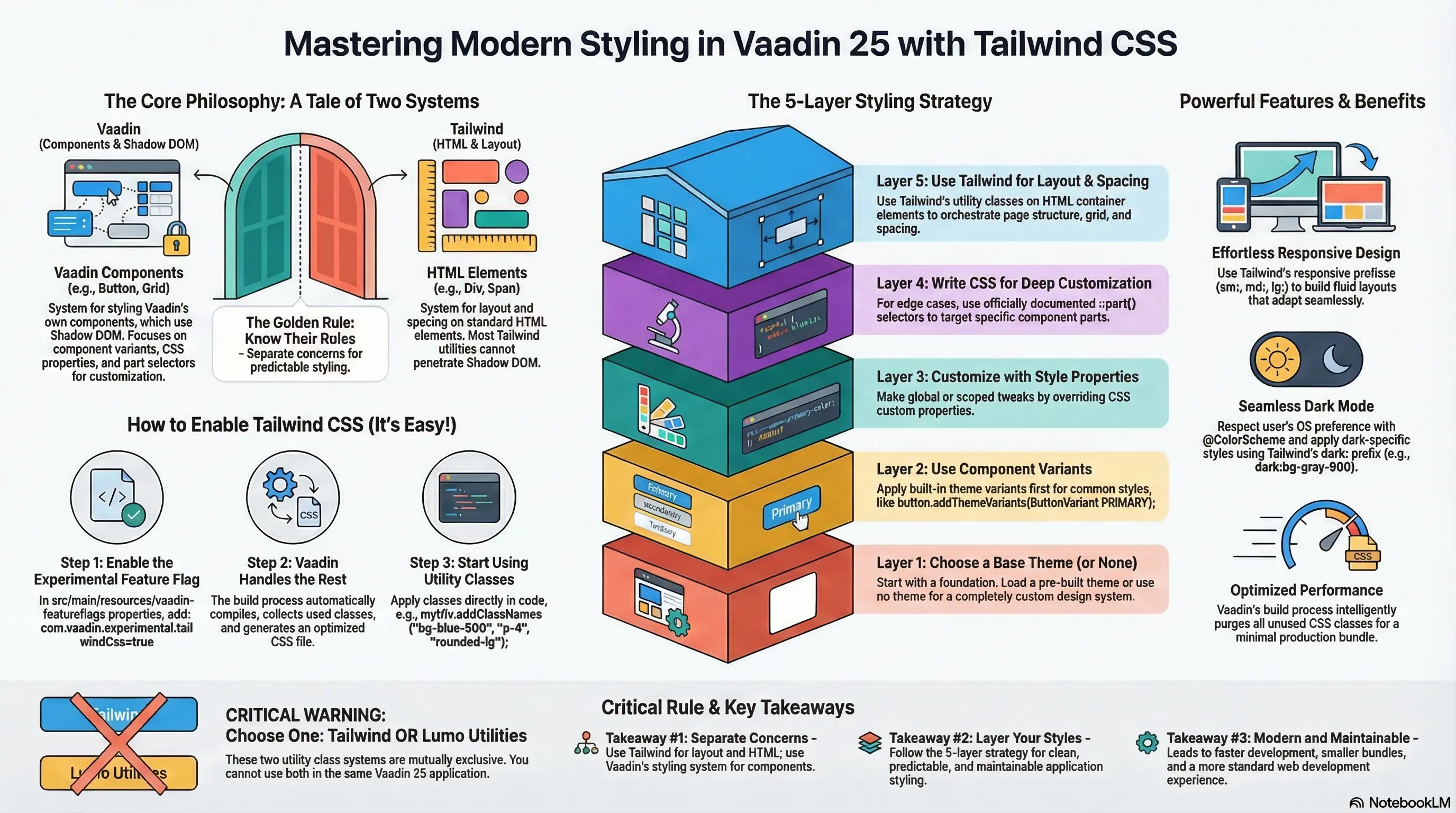
At the same time, Tailwind CSS has become a standard way to build modern, responsive UIs with small, composable utility classes instead of large component specific stylesheets. The new experimental integration in Vaadin 25 reflects this:
- Tailwind is enabled via an experimental configuration property:
com.vaadin.experimental.tailwindCss=true. - Tailwind theme and utilities stylesheets are injected into the application so that any Vaadin view can use their class names.
- Java views and components can call
addClassNameswith Tailwind utilities on HTML elements such asDiv,Span, orH1.
The vaadin-tailwind-landing project sits exactly at this intersection. It shows how to build a complete landing page while staying in Java and still enjoying Tailwind level control over layout, spacing, colors and typography.
What the Vaadin Tailwind Landing project demonstrates
The repository is designed as a learning and starting point, not just a code dump. It focuses on that specific question from the Vaadin community: how to actually use Tailwind with Vaadin Flow in a real screen, not just a trivial example.


At a high level, the project demonstrates:
A typical SaaS style landing layout
A hero section, supporting content sections, and a clear call to action. The structure is broken into small Java classes so each area of the page stays readable and easy to modify.Tailwind classes applied directly from Java
Layout, spacing, typography, and colors are controlled by Tailwind utility classes viaaddClassNamesonDiv,H1,Paragraphand other Vaadin or HTML components.Separation of structure and styling, even in Java
Page structure is expressed through Java component composition, while visual concerns are expressed with Tailwind class names. You keep familiar Vaadin patterns while gaining utility first styling.Vite based build pipeline
Vaadin 25 ships with a leaner frontend stack that uses Vite by default. The project embraces that stack so you do not need a custom frontend configuration to use Tailwind. Everything is wired to work out of the box with the experimental integration.A realistic starting point for product teams
Instead of a single card or button demo, you get a full page that can be adapted into a real product landing without rewriting from scratch.
If you already read the GladTek article on mastering Vaadin 25 with Tailwind CSS, this repository is the upgrade of the original use case with only a hero section, navigation and static footer.
Under the hood: how Tailwind is wired into Vaadin 25
Tailwind support in Vaadin 25 is still experimental.
The key ideas behind the setup are:
1. Enabling the experimental Tailwind feature
Vaadin 25 exposes Tailwind through an experimental flag. In configuration, you enable it with:
com.vaadin.experimental.tailwindCss=trueOnce this is active, Tailwind theme and utilities CSS can be injected so that any view in the application can refer to Tailwind classes in addClassNames.
2. Building the page with Java components
Instead of writing HTML templates, the landing page is assembled with regular Vaadin Java components and HTML elements:
- Container
Divfor major sections - Heading components for titles
- Paragraphs for descriptive text
- Additional components for buttons, links, and layout wrappers
This follows the same approach that the Vaadin team has shown in their Tailwind Flow examples, where a custom component is styled with Tailwind classes attached from Java.
3. Styling with Tailwind utilities from Java
The heart of the example is how Tailwind utilities are used in Java:
In the below case is how to handle a custom class btn-primary in order to not put all the tailwind classes in the java code:
Anchor primaryBtn = new Anchor("https://www.gladtek.com", getTranslation("hero.primary"));primaryBtn.setTarget("_blank");primaryBtn.addClassNames("btn-primary");.btn-primary { @apply px-6 py-3 rounded-xl text-white font-semibold transition-all duration-300; background-image: linear-gradient(to right, var(--brand-primary), var(--brand-secondary)); &:hover { box-shadow: 0 0 20px var(--brand-glow); @apply -translate-y-0.5; } &:active { @apply scale-95; }}Nothing block you from using code like this below too but as you can see it is not very readable and maintainable due to a lot of tailwind classes in the java code.
Div toggleBg = new Div();toggleBg.addClassNames("relative", "w-12", "h-6", "bg-slate-200", "rounded-full", "cursor-pointer", "transition-colors");In Vaadin 25 with Tailwind enabled, the equivalent Java code looks like:
Div heroBanner = new Div();heroBanner.setText("Welcome to your new landing page");heroBanner.addClassNames( "bg-blue-600", "text-white", "px-6", "py-4", "rounded-xl");This pattern keeps all the benefits of Tailwind (composable utilities, responsive modifiers, hover and focus states) while allowing Java developers to stay in their primary language.
4. Vite as the build tool
Vaadin 25 moves away from a heavy custom frontend pipeline toward a leaner Vite based setup. The landing page project uses that default integration rather than introducing a separate Tailwind build chain. Tailwind is brought in through Vaadin’s experimental support, which simplifies the configuration.
For developers, this means you focus on:
- Writing Java views and components
- Adding Tailwind utilities through
addClassNames - Letting Vaadin and Vite manage bundling in the background
Cloning and running the project
The repository is hosted on GitHub:
To try it locally:
Clone the repository
Terminal window git clone https://github.com/GladTek/vaadin-tailwind-landing.gitcd vaadin-tailwind-landingFollow the instructions in the project README
The project follows the standard Vaadin 25 setup, so the steps will look familiar if you have used a recent Vaadin starter. Typically this means running your usual Maven or Spring Boot command from the project root to start the application.Open the application in the browser
Once the app is running, you will see the complete landing page built with Vaadin 25 and styled using Tailwind utilities.
From there, you can start editing the Java views and immediately see how changes to Tailwind class names impact the layout and visuals.
Running with Docker
If you prefer to run the application using Docker, you can pull and run the official image:
docker run -p 8080:8080 achaabni/vaadin-tailwind-landing:latestAdapting the landing page to your product
The real value of the project is how quickly it can be turned into your own product landing.
Here are practical ways to adapt it.
1. Replace the content
- Update hero titles and subtitles to match your messaging.
- Replace placeholder text with concise, benefit oriented copy.
- Point primary buttons to your actual sign up, contact or demo flows.
Because the page is built from small Java classes, you will find where each piece of text lives and adjust it without hunting through a large HTML template.
2. Tweak the visual identity with Tailwind utilities
Tailwind makes it easy to adjust the visual language without touching separate CSS files:
- Change background and accent colors by swapping
bg-*andtext-*classes. - Adjust spacing with
p-*,m-*,gap-*utilities. - Refine typography with
text-*,font-*, andleading-*classes. - Improve responsiveness with
sm:,md:,lg:prefixed classes.
Each change is a small edit in the Java code that owns the relevant component, which keeps design iterations fast and targeted.
3. Extend the layout with new sections
If your product needs more structure than a basic landing, you can:
- Add new sections as separate Java classes that encapsulate both structure and Tailwind styling.
- Reuse patterns from existing sections to stay consistent.
- Keep each section self contained so future refactors remain simple.
Since the integration uses the same Tailwind utilities you would use in a plain HTML project, the Tailwind documentation and examples remain directly applicable.
When to use this template
This project is a good fit if you:
- Want a starting point for a marketing or product landing page built on Vaadin.
- Are evaluating Vaadin 25’s new styling model with Tailwind.
- Prefer to write UI code in Java but appreciate Tailwind’s speed and consistency.
- Need a minimal, focused reference of the official experimental Tailwind support.
It is less suited if you:
- Need a fully fledged design system or complex application layout.
- Want to rely exclusively on Lumo design tokens and utilities.
- Are on an older Vaadin version that does not provide the experimental Tailwind integration.
In those cases, the existing Lumo based theming options or a traditional CSS theme may be more appropriate.
🎬 See the theme color switch in Action
Conclusion
The vaadin-tailwind-landing project exists to answer a concrete need in the Vaadin community: a real, open source example that shows how to build a modern landing page using Vaadin 25 and Tailwind CSS together.
It is intentionally focused:
- One clear use case: a landing page.
- One clear stack: Vaadin 25, experimental Tailwind integration, Vite.
- One clear goal: make Tailwind styling feel natural to Java developers.
Clone it, run it, and adapt it to your product. It is a practical way to experience what the future of Vaadin styling looks like when combined with Tailwind CSS 4.