· Ahmed Chaabni · Jahia · 5 min read
The Jahia Experience Suite with Docker Compose
The Jahia Experience Suite. Is your local development environment production-aware?
- 1More Than a Dev Environment: 4 Takeaways from the Jahia Experience Suite
- 21. It’s an Entire DXP Ecosystem, Not Just an App
- 32. Enterprise-Grade Authentication is a First-Class Citizen
- 43. Automation is King with Declarative Provisioning
- 54. It’s Designed for Scale from the Start
- 6A Blueprint for Better Development Environments
- 7Use Case examples for custom modifications
More Than a Dev Environment: 4 Takeaways from the Jahia Experience Suite
In a previous blog entry we were talking about how to set up Jahia with Docker. In the current one we are talking about a 💎 repository about creating a DXP (not only CMS environment).
In order to know the difference checkout this article from Jahia : DXP vs CMS: Which is right for you?
Setting up a full-stack development environment can be a monumental task. Developers often spend days, not hours, wrestling with the complexities of wiring together databases, search engines, authentication providers, and the core application logic. The pain of mismatched versions, complex network configurations, and manual setup scripts is a familiar story for anyone working on a sophisticated platform.
When I stumbled upon the Jahia Experience Suite GitHub repository, I expected a standard Docker container for a single application. What I found was something far more impressive: a comprehensive, fully-integrated, and production-aware development ecosystem, all managed by a single docker-compose.yml file. It’s a powerful tool, but more than that, it’s a masterclass in architectural best practices.
These are not just features of Jahia, but valuable takeaways that any developer can learn from when building their own complex development environments (Call it the Swiss Army Knife for a Developer Workshop).
1. It’s an Entire DXP Ecosystem, Not Just an App
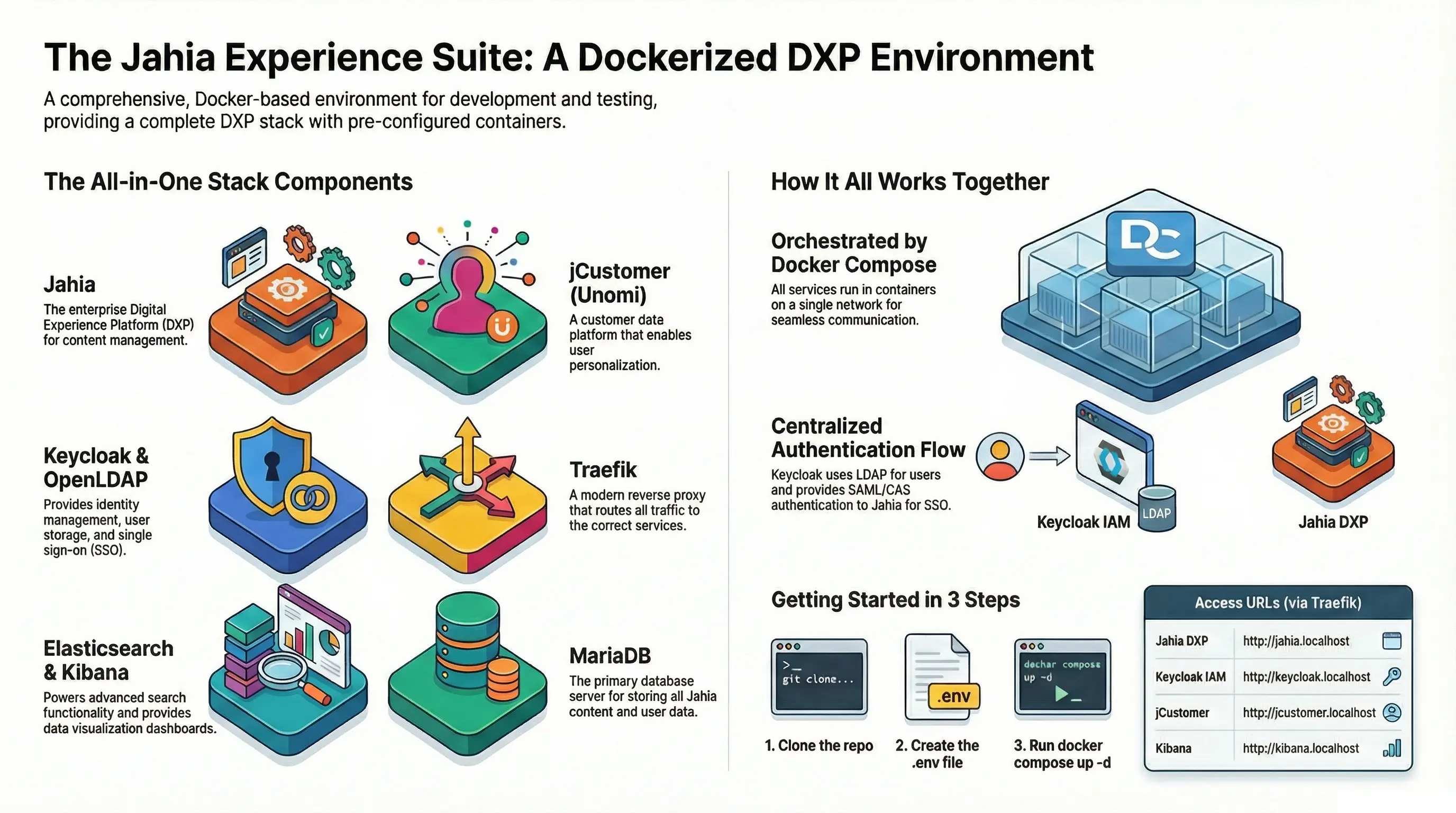
The first revelation is the sheer scope of the environment. This isn’t just the Jahia application in a container; it’s a complete, pre-configured Digital Experience Platform (DXP) stack. The project provides an entire ecosystem of services that work in concert, mirroring a real-world production setup.
The Docker Compose file orchestrates a diverse set of core components, including:
- Jahia: The core DXP for content management.
- jCustomer (Unomi): The customer data platform for personalization.
- MariaDB: The primary database server.
- Elasticsearch: The search and analytics engine.
- Keycloak: The identity and access management solution.
- OpenLDAP: The directory server for user storage.
- Traefik: The modern reverse proxy.
- Kibana: A data visualization dashboard for Elasticsearch.
- SMTP4dev: A local SMTP server for testing emails.
- phpLDAPadmin & phpMyAdmin: Web interfaces for managing the directory and database.
- Nginx: A web server for serving static provisioning files.
This entire multi-service architecture can be launched with a single command:
docker compose up -dBy providing not just the core services but also the full administrative toolchain for inspection and debugging, the environment becomes a massive accelerator, allowing developers to immediately focus on building features rather than wrestling with infrastructure.
2. Enterprise-Grade Authentication is a First-Class Citizen
Local development environments often use simplified, insecure authentication methods. This project takes the opposite approach by treating enterprise-grade security as a foundational element. It provides a sophisticated, pre-configured authentication flow that is ready for testing real-world scenarios from day one.
The environment uses Keycloak as a central identity provider, which is configured to use OpenLDAP as its user store. Crucially, it supports two major enterprise authentication protocols out of the box: SAML and CAS.
The depth of the integration is evident in the detailed pre-set configurations:
- SAML Name ID Format: Set to
urn:oasis:names:tc:SAML:2.0:nameid-format:persistent. - Attribute Mapping: Key user attributes like
email,firstName, andlastNameare pre-mapped. - User Federation: Settings connecting Keycloak to OpenLDAP are meticulously defined (e.g., specifying the Username LDAP Attribute as
cn).
This saves developers from the complex and error-prone task of setting up enterprise security, enabling them to validate complex authentication flows locally.
3. Automation is King with Declarative Provisioning
The heart of the environment’s automated setup is a single file: provisioning.yaml.
This file embodies a declarative, “configuration-as-code” approach that defines the entire state of the Jahia instance upon startup. Instead of a series of imperative scripts, this one file clearly specifies what the final environment should look like.
This single file automates a wide range of critical setup tasks:
- Installation of complete demo sites like “Digitall” and “Luxe”.
- Configuration of the LDAP integration for user management.
- Setup of jCustomer services for personalization.
- Integration of Augmented Search with Elasticsearch.
- Deployment of forms and interactive feature capabilities.
Note: This isn’t just simple configuration; it’s a sophisticated orchestration that executes scripts (
executeScript), pulls bundles directly from Maven repositories, runs GraphQL operations to manipulate content, and imports entire sites from ZIP archives.
This declarative approach is incredibly impactful, ensuring that every developer can spin up an identical, fully functional environment with absolute consistency and repeatability, drastically reducing setup time and eliminating “it works on my machine” issues.
4. It’s Designed for Scale from the Start
Jahia Experience Suite is designed to support clustering for high availability and load balancing, a feature typically used for production environments.
This is achieved by enabling clustering via environment variables and Docker Compose profiles. To start a two browsing nodes cluster, a developer simply update the .env file
JAHIA_CLUSTER_ENABLED=trueBROWSING_NODES=2COMPOSE_PROFILES=clusterthen runs a single command:
docker-compose up -dOnce the cluster is running, you can dynamically adjust the number of Jahia Browsing nodes using Docker Compose’s built-in scale feature. For example, to scale back to a single browsing node, you would use:
docker-compose up -d --scale jahia-browsing=1This forward-thinking design provides immense value. It not only facilitates local development on the core application but also provides a practical blueprint for testing and understanding how the platform behaves in a production-like, high-availability configuration.
A Blueprint for Better Development Environments
The Jahia Experience Suite repository is more than just a tool to run a DXP locally. It serves as a powerful example of how to build modern, integrated, and scalable development environments. By providing a full ecosystem, baking in enterprise-grade security, embracing declarative automation, and planning for scale from the start, it sets a high standard.
Use it in your workshops, in your demos or to quickly instantiate a complex environment without the hassle of configuring ports, environments, without installing databases locally in your machine. It is a Swiss Army Knife to enhance your productivity.
Use Case examples for custom modifications
- Configure Keycloak with different template
- Remove some layers that you won’t use
- Connect other docker images
- Install your local modules with provisioning scripts
- Change the default database (etc …)
Try it from Jahia Github
Want to check and use the related repository by yourself ?
Made with ❤️ by the Gladtek Team.